TRUSTED EXPERTS ANY DEVICE

Blog
  • Posted on: 3/12/2013


    Data Recovery

    Here at 24 Hour Data, we often consider ourselves doctors for our customers' data storage devices; we take “sick” (that is, crashed, damaged or virus-infected) hard drives, solid state drives, and RAID arrays, recover lost data, and make them “well.” As a side effect, we reduce our customers' stress, help lower their blood pressure, and we like to think we've prevented more than a few anxiety attacks caused by potential lost data.

    But that's where the analogy ended... until recently. 

    Researchers at the European Bioinformatics Institute (EBI) says they've developed a way to store data in man-made, DNA-like strands. This DNA storage doesn't require any power and, unlike a hard disk drive which can wear out, causing a data recovery emergency, DNA storage may last tens of thousands of years. Nothing else on the market approaches the storage capacity, either; a report at TechRadar.com http://www.techradar.com/us/news/computing-components/storage/scientists... says users could store 100 million hours of HD video in a cup of DNA. 

    The drawback right now, as is so often the case with new technology developments, is the price. But researchers say that synthesizing NA from encoded information could become affordable within the next 10 years. 

    We're not sure what exactly could go wrong with data encoded on DNA-like strands. But we've seen data storage materials and storage devices come and go, and evolve, over the years here at 24 Hour Data. We're sure, no matter where businesses and individuals are storing their data, there will always be a chance of data loss and data recovery professionals will be needed to recover that data. 

    In the next few decades, when we think our data recovery specialists as “data doctors,” that name may be even closer to the truth. 


  • Posted on: 3/07/2013

    Lacie RAID Recovery

    LaCie has introduced a new, five-bay RAID array that it's calling the 5big Thunderbolt, with up to 20TB capacity. Allowing for custom RAID configurations but pre-configured at RAID 0, both the 20TB an 10TB versions have speeds up to 785MB per second via five 7200 RPM/64 MB cache hard disks. 


    Designed for Video Pros

    The 5big Thunderbolt is tailor-made to edit multiple 2K uncompressed 10-bit streams, says the manufacturer, making it ideal for video post-production work. Users can use fast volume in conjunction with popular software like Final Cut Pro X, Adobe Premiere and Aperture.


    The RAID array includes two Thunderbolt ports. Up to six Thunderbolt peripherals can be daisy-chained together to further increase storage capacity and back-up capabilities. 


    Back-ups, Hot Swap Capabilities and More To Avoid Emergency Data Recovery

    An IT manager can easily assign the RAID array to back up one drive per day during the work week. 

    When configured as a RAID 1, the disks are hot swappable, to change drives on the fly without shutting down the array. 


    Reliability is a key in any data storage device. The 5big Thunderbolt RAID array uses a heat-dissipating aluminum casing, a Noctua cooling fan and large heat exhausts to prolong the life of the hard disk drives and prevent overheating, which could lead to a data recovery emergency. 


    Video professionals store mission critical creative work, video footage that would be difficult and expensive, if not impossible, to replicate, and important files that must be complete by very specific deadlines on their RAID arrays. 


    It's important to use the latest data storage technologies to prevent the likelihood of a data recovery emergency. But it's even more important to have a data recovery service you can trust, with data recovery specialists who stay up to date on the latest data recovery methods for the newest hard drives, RAID arrays and more.


    You can trust 24 Hour Data for all your RAID recovery needs. We hope you won't have to call us to recover your video footage the day before that commercial you spent weeks working on is set to air... but we're here if you do need us. 

  • Posted on: 2/28/2013


    Cooling a PC


    Overheating PCs, which can lead to a burnt out hard drive and potential data loss, are always a danger. In the summer, PCs and servers may overheat from outside or indoor temperatures. But in the winter, hard disk drives may also overheat if a home or business is kept too warm, with the heat turned up too high. PCs give off their own heat when they run, so they need to be kept cool in order to perform optimally. 

    In most cases, the included fans or heat sinks should be enough to keep an “off-the-shelf” PC, server or hard disk drive cool. But if you overclock your electronics equipment, you may need to add additional cooling mechanisms. Processors work overtime when you overclock, and they begin to run hotter, which can lead to a burnt out hard disk drive and data loss emergency. 

    Let's look at some of the different cooling methods you can use to keep a desktop PC unit or server cool. 

    Fans - Fans are by far the most common methods to keep a PC cool. CPU fans will blow air away from the processor, one of the hottest-running parts of your PC. A case fan is typically an aftermarket part you can add to your PC, to blow air out of the vents of your PC case to keep all the internal parts cooler. 

    Heat sink - PC fans work inside your computer in conjunction with a heat sink. A heat sink is a piece of metal, usually aluminum or copper, which draws heat away from the CPU chip. A fan near the heat sink pushes the hot air away from the chip and out of the computer. In active heat sinks, a second fan is located directly above the processor to help it cool properly. 

    Water Cooling Systems - While the term “heat sink,” may imply using water to cool your PC, that's not the case. A water cooling system is very different from a heat sink. A water cooling system pumps cool liquid (within tubes, so the components of your PC don't get wet) down to the CPU. The liquid absorbs the heat, and then the liquid is pumped out of the PC and cooled down to begin another cycle. 

    If you want to take your PC cooling to the next level, a water cooling system could be a good investment. 

    Choosing a PC Cooling System

    In most cases, the cooling system installed by the manufacturer, usually a heat sink and fans, is enough to keep your PC cool. 

    If your PC is overheating, you could risk data loss. Turn your PC off and move it to a cooler room to cool down. If your computer won't boot up or you can't access your data after your PC has overheated, you could be facing a data recovery emergency. 

    Don't attempt do-it-yourself data recovery; call the data recovery specialists at 24 Hour Data to help. 


  • Posted on: 2/26/2013


    Data Recovery


    Are you facing a data recovery emergency in your home or business? Data recovery emergencies happen when you least expect them and, like any other type of disaster, it helps to be prepared. 

    The best way to be prepared for a hard drive crash or RAID server failure is by always backing up your data in three separate places, and keeping the number of a trustworthy, professional data recovery service on hand in case you need it. 

    How do you find the best data recovery service in your area? Here are a few questions to ask when you're considering a professional data recovery firm. 

    1. What's your success rate for RAID recovery, hard disk recovery, solid state recovery, mobile recovery? (Or whatever type of data recovery you need.) - 24 Hour Data has an industry high 99 percent success rate for hard disk data recovery, and unmatched success rates for other forms of data recovery, too. 

    If you are taking the time to ship your hard disk drive or other storage media to a professional data recovery firm, you want the best chance you'll get your data back, don't you? 

    2. Do you offer a guarantee? 24 Hour Data's famous “no data, no charge” guarantee means that if we can't recover your lost data, there's no charge for our services. You have nothing to lose and everything to gain by calling 24 Hour Data for a price quote. 

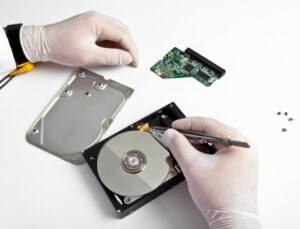
    3. Do you have a certified clean room environment? - Physical hard disk data recovery, which requires the hard disk case to be opened, must be performed in a clean room environment, to prevent microscopic dust particles from getting on the platters, hindering data recovery, and damaging the hard disk even further. 

    24 Hour Data has an ISO 5 (Class 100) clean room environment for physical data recovery. 

    4. Do you offer a free diagnostic? - No one wants to risk calling a data recovery service, paying for data recovery, but not getting any of their data back. We don't think that's any way to run a business, either. When you ship your hard drive or storage media to 24 Hour Data, we will provide a free diagnostic and honest price quote within 24 hours of receiving your storage device. Then you can decide if it's worth it to go ahead with the data recovery or not. You can make an educated decision based on the value of your data and the estimated price to recover it. 

    5. Do you offer 24 hour, personalized service? - When you're facing a data recovery emergency, the last thing you want is to be stuck in a voice mail maze and unable to reach a human being. Our data recovery specialists are always available to answer the phone, 24/7, 365 days a year. If, at any point in the data recovery process you have a question, we'll take your call. 

    You can start the data recovery process easily online or over the phone, so you'll know your data is in good hands and you'll be free to focus on other things in life. 

  • Posted on: 2/21/2013


    Data Recovery


    When your hard disk drive crashes, or you can't access the data on the solid state drive in your mobile device, your first instinct might be to panic. We all know that terrible feeling. Our PC or laptop and, more than ever today, our smartphone or tablet, is our lifeline. In most cases, it's our career. It's also the way we communicate with friends and family, pay bills, find entertainment options, share (and take!) photos, listen to music, stream movies... There's a lot of important data on your PC or mobile device. 

    In the event of a hard drive crash, there are do-it-yourself data recovery techniques you can use and even software you can purchase. But, often, using these DIY data recovery techniques can actually cause more damage to your hard drive, decreasing the chances that you will have a successful data recovery.

    When a hard drives crashes due to logical failure (that means the hard disk drive components themselves are not damaged, only the data on the platters), each time you ask the hard disk to perform a function, such as trying to read data, you are overwriting the data. This makes it harder for a professional data recovery service to get that lost data back.

    If your hard disk drive has suffered physical damage, either due to fire, flood, shock damage, or because the platters are sticking, you could do even greater damage by trying to read the data on the disk. The read/write heads may get stuck to the platter, physically ripping the data off the platter and rendering it completely irretrievable. 

    When you decide to risk do-it-yourself data recovery, there is no guarantee you'll get your data back. In fact, you could damage your hard disk drive or solid state drive beyond repair. 

    If you call 24 Hour Data to recover your lost data as soon as you notice a problem, the odds increase substantially that we will perform a successful data recovery for you. 

    If, for whatever reason, we can't recover your lost data, there's no charge for our service. That's our “no data, no charge,” guarantee ... and what that means to our customers is that there's never any risk. 

    There's nothing to lose when you call 24 Hour Data for your data recovery service ... and everything to gain, including your lost data and that happy feeling that comes from knowing you've retrieved all your movies, music, family photos and anything else that may be stored on your hard drive or mobile device. 


  • Posted on: 2/19/2013


    SSD Recovery


    IHS iSuppli, technology industry market research firm, predicts double-digit drops in the sales of conventional hard disk drives (HDDs) in 2013. The culprit? the increase in mobile devices, such as smartphones and tablets, for computing. These slim, lightweight devices rely on solid state drives (SSDs) over larger, conventional hard disk drives. 

    Hard Disk Drive Sales by the Numbers

    The IHS iSuppli report says that hard drive market revenue will drop 11.8 percent in 2013. The market is by nowhere means “small,” though, and we shouldn't expect the death of the HDD quite yet. The 2012 fiscal year had HDD revenues of $37.1 billion; that could drop to $32.7 billion this year, and, even further, down to $32 billion in 2014. 

    Death of the Hard Disk Drive?

    The HDD isn't going anywhere yet; hard disk drives still represent the least expensive form of storage per gigabyte. This generation of notebook and laptop computers often use a hybrid disk drive, or pair a conventional HDD with an SSD to balance cost efficiency with the energy efficiency, added durability and performance offered by solid state drives. 

    The growth of cloud data storage systems, big data server farms, and larger-than-ever RAID and virtual servers are also helping to keep the hard disk drive market stable. SSDs are still cost-prohibitive for such data-intensive applications. 

    The iSuppli report, however, says we won't be seeing a lot in the way of external hard disk drives in the future. Cloud storage and internet-based back-up solutions could make conventional external hard disk drives all but obsolete by the end of the decade. 


    Will Hard Disk Prices Drop? 


    The study noted that hard disk drive prices could slip by as much as 7 percent in 2013 as consumer demand drops. But manufacturers are forced to stay on the cutting edge of developing new, better storage devices, and may inflate prices to pay for those research & development efforts. 


    Hard Disk Recovery: Still Important

    As conventional hard disk drives near the end of their life cycles, they might be replaced by solid state drives. But the data on hard disk drives still needs to be recovered. Businesses and individuals store thousands, or even millions, of dollars worth of data on hard disk drives and RAID servers. Hard disk drives are easily replaceable, but that data is not. 


    The industry will need professional hard disk data recovery experts well into the next decade. 24 Hour Data stays top of all HDD developments in order to bring our customers the latest hard disk data recovery techniques and an industry-high 99 percent success rate when it comes to hard disk data recovery


  • Posted on: 2/07/2013

    SSD Recovery

    Solid State storage continues to drop in cost and grow in popularity, while hard disk drives are still making a strong showing at CES 2013. Let's take a look at some of the offerings in these categories from this year's show floor: 


    Western Digital Helium-filled hard disk drive - By filling the gaps between drive platters with helium rather than air, the new drive from Western Digital's HGST fits seven platters in a typical drive instead of the standard five. The drives also fit more data on each platter, and offer reduced drag for faster operation speeds and cooler running temperatures. Top tech site Engadget shares the rest of the story: http://www.engadget.com/2012/09/14/hgst-develops-helium-filled-high-capa...


    Toshiba SDHC Memory Card with TransferJet technology - As devices become smaller, more capabilities are combined in to fewer components. Toshiba's new SDHC memory card employs a TransferJet receiver, a promising new wireless communications technology, along with NAND flash memory. In prototype only, the technology, if released, will find a home in digital cameras, PCs and other devices that use SDHC memory. 


    More Advances in Flash Memory - Look for more durable, longer lasting, higher capacity NAND flash memory cards and Solid State Drives as companies like Macronix find a way to extend the write life of flash cells with exposure to temperatures near 800 degrees Celsius. “Flash companies will be working with this new development for 2013, since the reduction of wear and tear in flash cells means that TLC, or three-level cell, flash will get more use,” say our friends at the blog Premium USB, http://blog.premiumusb.com/2012/12/flash-digital-storage-in-2013/ in their own 2013 preview. 

  • Posted on: 2/05/2013


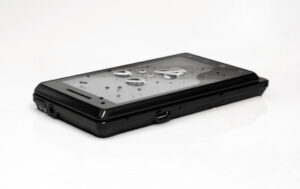
    Whether you dropped your phone in a puddle (or a toilet), or you're an East Coast resident whose smartphone was damaged in Hurricane Sandy (or during the extensive relief and recovery efforts that followed), water damage is one of the worst -- and most common -- things that can happen to your phone. 


    Fortunately, water damage to your smartphone doesn't always mean your data is gone forever and your phone is a lost cause. Most SSD and flash memory used in phones are waterproof. It's the other components that are susceptible to water damage. 


    Sometimes, simply drying out your phone will fix any temporary damage. Other times, drying out the phone will permit you to turn it on long enough to retrieve your data and sync it to your computer, iTunes, or even transfer it to a new smartphone. 


    Follow these steps to maximize the odds that you'll be able to retrieve your important data and maybe even save your smartphone. 


    1 - Turn off the phone, and keep it off. Do this first to prevent further damage. Remove the battery.

    2 - With a towel, paper towel or even your shirt, dry off the phone as best you can. 

    3 - Fill a zip-closure storage bag or a plastic, sealable storage container with uncooked rice. Bury your phone in the rice and seal the container. 

    4 - Keep the phone in a warm, but not hot, area, for at least 24 hours or longer (if your phone was splashed with water, 24 hours should suffice; if it was completely submerged, you may want to store it for two days).

    5 - Finally, remove the phone from the container, put the battery in and attempt to power it on. Now is the time to back up your data. Your phone might last for several more years or months, but it could show signs of damage after just a short time. 

    6 - If your phone still isn't working, a professional data recovery service may be able to recover your smartphone data. Call us immediately to get a free estimate within 24 hours. 


    Always remember to perform regular back-ups of your important apps, documents, photos and contacts, to prevent data loss if your phone is damaged. 


    Drying out data storage devices is not recommended for conventional hard disk drives, only for devices like smartphones, which use solid state memory. You can find out how to improve the odds of a successful data recovery for a RAID array or conventional hard disk drive here

  • Posted on: 1/31/2013


    Virtual Recovery


    Are you an IT director considering introducing thin provising to increase data storage space on your virtual machines? Whether you're using VMWare, Citrix, Microsoft Hyper-V or another virtual server solution, thin provisioning in virtualized environments has several advantages when it comes to increasing data storage availability. 


    Here are just a few of the advantages of thin provisioning in a virtual environment: 


    - Thin provisioned VMDKs (Virtual Machine Disks) can be created more quickly, saving IT staff time

    - Permits users to dedicate more storage capacity than what is actually available

    - Unused space is not allocated; space is only allocated as needed, providing more intelligent provisioning of storage capacity


    One danger of thin provisioning is that storage space may not be available when a mission critical application needs it to run. But alerts can be set up to let administrators know there is a danger of running out of space or percentages of space have been over-committed, increasing the likelihood of running out of space. 


    Future developments may lead to thin provisioned disks that allocate space based not on frequency of an application's use, but on the importance of that application. 


    Thin provisioning adds yet another layer of complexity to virtual servers. If something goes wrong in your virtual environment with thin provisioned VMDKs, you'll want to turn to data recovery experts specializing in VMWare and virtual servers. 


    For years, 24 Hour Data has been perfecting our VMWare data recovery techniques to stay on the cutting edge of the field. Our virtualization expert will recover lost data from your virtual machines and get your virtual servers back up and running, so you can get back to business faster, with less downtime and less stress. 


    Regardless of how you configure your VMDKs, with thin provisioning, thick provisioning, or a combination based on the applications, 24 Hour Data is here to help you with any VM data recovery emergency, with industry high data recovery success rates and a professional staff of data recovery specialists always available to answer your call. 

  • Posted on: 1/29/2013


    Western Digital Recovery

    Small businesses often need centralized data storage for apps and data, beyond what desktop PC units can provide. But if you're running a small business, you may not need a large server, and all the costs associated with running that server. 


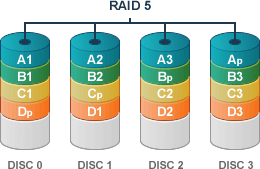
    The WD Sentinel DX4000 from Western Digital can meet the storage needs of a small business of fewer than 25 employees, with a RAID-enabled storage system and storage capacity up to 16 TB. The Sentinel connects to your office PCs or Macs wirelessly, via Ethernet or via USB 3.0 and uses an Intel Atom™ D525 1.8 GHz Dual Core processor with 2 GB RAM. It supports RAID 1 storage with two hard disk drives and RAID 5 with three or four drives. 


    The server is also recommended as a backup storage device for small businesses, providing the peace-of-mind that comes with regular back-ups in a centralized location. The small business file server provides remote access via the internet for troubleshooting, service or to access files from anywhere, at any time. 


    RAID Server Data Recovery


    If you've previously worked with separate PCs, storing all your small business data on one centralized RAID server may seem scary. What happens if something goes wrong with the server, from a virus to hard disk failure, or even a physical problem like a power surge, fire or flood? 


    That's where 24 Hour Data can help. 


    We have decades of experience in RAID 1 and RAID 5 data recovery. If your small business server fails, we're here to help.


    We know that every minute of productivity counts when you're running a small business. We will recover and re-build your RAID array within 48 hours, in most cases, to get your data back and get you back up and running quickly. 


Pages

Subscribe to Blog