TRUSTED EXPERTS ANY DEVICE

Blog
  • Posted on: 1/24/2013


    Electric Surge


    Surge protectors are one way to protect your sensitive electronic devices, including laptops, PCs, Macs, home media servers, mobile devices and more from damage caused by power surges. Power surges often occur during lightning storms, when power comes on following an outage, upon turning off or turning on electronic devices, or sometimes for no reason at all, when excess electricity “surges” through the power lines. 


    Surge protectors also protect against everyday “interference” that can also affect your electronics' operaton. 


    For a very low cost, you can protect devices from this type of damage, which can corrupt data and cause a need for emergency data recovery service. But before you select a surge protector for your home or your business, there are a few things you should know. 


    1. The clamping voltage determines, in part, the quality of protection the surge suppressor offers. This is the amount of energy that will trigger the surge suppressor. Look for a suppressor with a clamping voltage of at least 330. 


    2. Surge suppressors should be UL listed with a rating of UL 1449, the Underwriters Laboratories standard for surge suppressors. Multi-outlet devices that don't carry this rating are merely good to extend the number of outlets, and should not be used with today's sensitive electronics. 


    3. The warranty on a surge protector only covers the value of the electronic devices connected to it, not the value of the data stored on those devices, or any other consequences of a device being damaged, such as lost productivity if an office server  fails. To select a surge protectors with the right warranty for your equipment, add up the replacement value of your equipment and make sure your surge protector will cover the replacement cost. 


    Whether or not you use surge suppression technology (which you should!) you'll want to make sure you can call a reputable data recovery service, like 24 Hour Data, to recover lost or corrupt data caused by a power surge. Whether you're running an office or storing hours worth of movies and music on a home media server, the value of your data is often much, much higher than the price of data recovery, making hard disk, RAID server, SSD and smartphone data recovery well worth the cost. 


  • Posted on: 1/22/2013


    VMWare Recovery

    VMware vSphere Storage Thin Provisioning dramatically increases virtual machine storage utilization by enabling dynamic allocation and intelligent provisioning of physical storage capacity.

    Storage Thin Provisioning gives you higher utilization by letting you dedicate more storage capacity than the actual available capacity. Traditionally, application administrators estimated and requested capacity, keeping future growth in prospective. This over-provisioning of capacity resulted in unused space, similar to the problem of RAM over-commitment in the server space.  


    7 - WD Small Business Server Answers the Need for Small Business Data Storage

    Small businesses often need centralized data storage for apps and data, beyond what desktop PC units can provide. But if you're running a small business, you may not need a large server, and all the costs associated with running that server. 


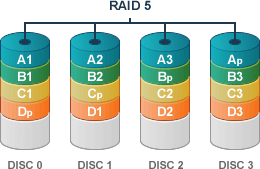
    The WD Sentinel DX4000 from Western Digital can meet the storage needs of a small business of fewer than 25 employees, with a RAID-enabled storage system and storage capacity up to 16 TB. The Sentinel connects to your office PCs or Macs wirelessly, via Ethernet or via USB 3.0 and uses an Intel Atom™ D525 1.8 GHz Dual Core processor with 2 GB RAM. It supports RAID 1 storage with two hard disk drives and RAID 5 with three or four drives. 


    The server is also recommended as a backup storage device for small businesses, providing the peace-of-mind that comes with regular back-ups in a centralized location. The small business file server provides remote access via the internet for troubleshooting, service or to access files from anywhere, at any time. 


    RAID Server Data Recovery


    If you've previously worked with separate PCs, storing all your small business data on one centralized RAID server may seem scary. What happens if something goes wrong with the server, from a virus to hard disk failure, or even a physical problem like a power surge, fire or flood? 


    That's where 24 Hour Data can help. 


    We have decades of experience in RAID 1 and RAID 5 data recovery. If your small business server fails, we're here to help.


    We know that every minute of productivity counts when you're running a small business. We will recover and re-build your RAID array within 48 hours, in most cases, to get your data back and get you back up and running quickly. 


    If we can't recover your data, there's no charge. That's the 24 Hour Data guarantee. But with an industry-highest % data recovery success rate. 


  • Posted on: 1/17/2013

    Virtual Recovery


    One of the well-known drawbacks to server virtualization is a drop in performance, along with an increase in storage requirements. As storage continues to drop in price, the second factor becomes less of a problem, as the benefits of virtualization far outweigh these drawbacks. But today's technology provides solutions; IT directors and organizations no longer have to make sacrifices to enjoy the benefits of virtualization. 


    One solution to the performance issue is a storage hypervisor, a virtual appliance offered by a number of different manufacturers. The hypervisor is installed on each physical virtualization host and intercepts I/O requests before they get to the server, writing them to a log file and then to a pool of shared heterogenous storage. This can improve performance by 10 times normal while reducing storage requirements up to 90 percent. Virtual disks are “thin provisioned,” to make the most of storage capacity in a virtual environment. 

    Most virtual servers have the capability to perform thin provisioning, but not every organization uses this as a solution to the wasted storage capacity inherent in a virtual server. Experts warn against using thin provisioning in applications where storage requirements vary significantly and change quickly, or in applications where mission critical data is stored on the virtual server. 


    Data Recovery Challenges in a Virtual Environment

    When data resides on a virtual server and is further stored in a heterogenous data pool, such as exists when using a hypervisor appliance, do-it-yourself data recovery becomes extremely difficult. Few IT directors have the expertise to recover lost or corrupt data from hard disk drives used in a virtual environment. 


    In spite of the benefits of virtualization, many organizations are hesitant to face the challenges of moving to a virtual environment. They worry that if a hard disk or RAID array fails in a virtualized environment, no one will have the expertise to recover the lost data. 


    Because of their back-up methods, virtual servers are less prone to data recovery emergencies than nearly any other storage technology. But, just in case, 24 Hour Data's recovery experts stay up-to-date on the latest virtualization technology in this rapidly changing field. Whether you're using VMWare or other virtual server technology, our data recovery specialists are here to help recover your lost data and help you rebuild your virtual server, all in record time. 

  • Posted on: 1/15/2013


    Surge Protector


    Storms can wreak havoc on electronic equipment, leading to data recovery emergencies for Dallas and New York business owners,families and individuals. Did you know there's an inexpensive, easy way that you can help protect your hard disk data from corruption during a storm or power outage? 


    A surge suppressor will divert any extra electricity transferred during a power surge to the ground through the electrical outlets ground wire. This keeps the electricity from damaging your sensitive electronic equipment. But what should you look for in a surge protector to help protect your electronics from power surges and avoid a data recovery emergency? 


    Your surge suppression needs will vary depending on whether you use your computer or other electronic device for home, a small office or a server farm. Here are some of the basics of choosing a surge suppressor. 


    1 - Level of protection - The greater protection offered, the safer your equipment will be plugged in to that surge suppressor. Some household surge suppressors will protect against small power surges, but not massive amounts of energy going through the lines. Look at the “surge current capacity” as a measurement of how much surge current your surge protector can pass through in a single incident. This is commonly measured in kiloamperage. Look for a surge protector with a kA rating at or above 10kA. 


    2. Number of outlets - Make sure your surge suppressor can accommodate all your devices, including computer, peripherals such as a printer, or smartphones and tablets you may wish to charge through an AC outlet. 

    '

    3. Warranty - Many quality surge suppressors offer a warranty that covers the value of your sensitive electronics equipment, if it should be damaged by a power surge while connected to the surge suppressor. Make sure the warranty covers the replacement value of the equipment you plan to protect. Typically, the higher the warranty cover, the more the surge suppressor would cost. 


    Keep in mind, a surge protector's warranty does not cover the value of the data lost, only the equipment. It also does not cover data recovery costs, the cost of lost productivity, lost customers, or other costs that may be associated with failure of your computer systems and the loss of mission critical data. 


    Surge protection is one way to protect against a data recovery emergency, but 24 Hour Data is always standing by to save the day with hard drive data recovery if you should lose data following a power surge. 

  • Posted on: 1/10/2013


    Samsung Recovery


    The next generation of tablets and smartphones could have the processing power and data storage of today's notebook PCs, if new NAND flash memory introduced by Samsung is any indication. 


    The technology giant recently announced the mass production of its 128 GB NAND flash memory for smartphones and tablets. 


    The 128GB eMMC (embedded multimedia card) Pro Class 1500 is the successor to 16 GB, 32GB and 64GB NAND flash memory from Samsung. All versions of the cards read data sequentially at speeds up to 140MB/s, with a write speed as high as 50MB/s. 


    The storage device combines eight Samsung 64GB NAND memory layers in a fully managed NAND with a high performance controller and intelligent flash-management firmware, and is small enough to fit in to even the smallest smart phones. 


    Cutting Edge Technology Requires Cutting Edge Data Recovery Techniques

    These industry-leading cards use sophisticated technology in a very small space, requiring the most precise techniques for data recovery in the event of data loss from logical or physical damage. As experts in Samsung data recovery, 24 Hour Data's recovery specialists have already equipped themselves with the knowledge and expertise to recover mission critical data, important contacts, photos, and files from the new Pro Class 1500 cards. http://www.xbitlabs.com/news/memory/display/20120919223027_Samsung_Begin...


    With the cards now in mass production, we can expect to see them in Samsung smart phones and other mobile devices soon. You can treat yourself to the newest mobile device, or buy it for someone special as a holiday gift, and know that you can call on 24 Hour Data in the event of catastrophic data loss requiring emergency data recovery. 


  • Posted on: 1/07/2013


    Virtual Recovery 


    http://www.enterprisestorageforum.com/storage-technology/storage-challen...


    While virtual servers are growing in popularity, they haven't quite taken off to the extent that some industry experts predicted or expected. About 50 percent of the world's data centers still have not been virtualized. 


    There are three main reasons why IT administrators who have not yet jumped on the virtual server bandwagon are hesitant to adopt the technology. Let's explore these reasons and some possible solutions. 


    As a side effect of implementing virtualization best practices in your organization, you will also reduce the odds of a data recovery emergency and the potential for mission critical data loss. Well-managed virtual server environments are less prone to crashing and hard drive failure. 


    Virtualization Challenge #1


    Server sprawl is cited as the number one challenge to managing a virtual network, whether it is VMware, Citrix or another popular virtualization product. - Because virtual servers are so easy to create, IT departments often create servers and fail to manage them, resulting in additional storage costs and stress on the server.


    To avoid server sprawl, take care to delete VMs when they are no longer needed and avoid the temptation to spawn new VMs from standard images, which allocate more storage space than is needed. 


    Virtualization Challenge #2 

    Creating successful, timely back-ups without taxing resources or bringing the servers and operations to a grinding halt. - Snapshots create effective and timely back-ups, but are resource hungry and often cannot be taken while other applications are running. This poses problems with data back-ups and disaster recovery. 


    New software solutions, however, make it possible to create data back-ups automatically while applications are in process, without a significant drop in performance. 


    Virtualization Challenge #3 -

    Having the right processes, procedures and personnel in place to manage virtual servers can take care of the first two virtualization challenges easily. You already know that you can count on 24 Hour Data to recover mission critical data from your VMWare or virtual server in a data recovery emergency. You can trust our sister company, 24 Hour Computer, to establish and manage your virtual server, too. If you prefer to manage IT resources in house, remember that, once set up, it takes less time and personnel to maintain a virtual server, resulting in reduced IT costs. 


    If your organization hasn't taken the step to virtualization, it might be time to consider VMware, a Citrix virtual server, Microsoft Hyper-V server, Oracle VM or any other type of virtual server. 24 Hour Data supports all major brands of virtual machines, so you know you're protected in the event of a data recovery emergency

  • Posted on: 1/02/2013

    Phone Recovery


    As 24 Hour Data stays on the cutting edge of smartphone data recovery, it's interesting to watch the market and track cell phone sales, in order to continue our data recovery research and development efforts in the fields of the most popular smartphones. For several years now, Samsung and Apple have led the pack, but in the third quarter of 2012, Samsung is widening the competitive gap. 


    According to ABI Research, Samsung Electronics Co. Ltd. shipped more than twice as many smartphones as Apple, Inc. in Q3 2012, in large part due to the popularity of the Galaxy SIII. 


    Last quarter, industry leader Samsung shipped 55.5 million smarphones, while Apple shipped 26.9 million. 


    Samsung Data Recovery

    As those in the data recovery and IT industries know, Samsung is also an industry leader in hard disk drives and solid state drives. 24 Hour Data's hard drive recovery specialists are always on top of the latest Samsung technology -- and it is no different with the company's smartphones and tablets, including the Samsung Galaxy and Galaxy Note. 


    Apple Data Recovery

    24 Hour Data's recovery facilities also include certified Mac engineers, experts in Mac service and data recovery, including iPhone and iPad recovery. We have been part of the Mac family for more than 15 years, providing service and data recovery on all Mac devices without voiding the warranty. 


    Expert Data Recovery for All Smartphones and Tablet Devices

    Whether you choose Samsung or Apple or one of the other popular smartphones or tablets, whether you use your mobile device for business, pleasure or both, 24 Hour Data is constantly working to develop the most effective data recovery techniques for the latest mobile devices. You can trust us with your mission critical files, as well as your family holiday photos. 


    Mobile device data recovery is a relatively new field, and one in which many people attempt data recovery themselves. Don't risk losing your data and your memories; call 24 Hour Data for your tablet and smartphone recovery right away. 

  • Posted on: 12/18/2012


    Hard Drive Recovery


    When Hurricane Sandy ravaged the East Coast last month, thousands of families and business owners lost homes, offices, personal possessions, productive working time and mission critical data. 


    Even those homes and businesses who weren't directly hit by the powerful storm surges and high tides may have lost mission critical data when power came back on following the storm. Power surges can cause logical and physical damage to hard disk drives and solid state drives, resulting in data loss. And, according to reports, this is not the end of the bad weather for the season for our northeastern friends. Wherever you live, here are some tips to help prevent data loss in the event of a power outage. 


    1 - Prepare for a storm or possible power outage by backing up all mission critical data.

    2 - Stay off plugged-in electronic devices such as PCs, Macs and laptops during a storm if there is any chance of a power outage. If you're using a laptop, Macbook, iPad, tablet or smartphone, unplug the device and use battery power only.


    3 - Use a surge protector year-round for your important electronic devices, including computers, laptops, servers and RAID arrays. 


    4 - If you're not using a computer or any piece of electronics, from your microwave to your flat screen TV, unplug it if there is a power outage, to protect it from power surges when power is restored. 


    5 - If your computer fails to boot following a power outage or power surge, you may be able to troubleshoot the problem. It is most likely the power supply that was burnt out. Try switching out the power supply with another and booting up the machine. Another likely culprit is the motherboard, a component that can be switched out by IT staff or a layman with computer knowledge. If switching out either the power supply or motherboard works, but you still cannot access data files, do not attempt data recovery yourself. Call 24 Hour Data for a free, honest price quote and fast, friendly service. 


    Many people do not realize the damage power surges can cause when power is restored to a neighborhood or industrial area following outages. During a storm, transformers can blow out, causing fires and power surges before the loss of power. Make sure to charge all electronic devices before a storm so you have them when you need them in the event of a power outage. 


  • Posted on: 12/12/2012

    Hurricane Sandy Recovery


    Not only did Hurricane Sandy, the Superstorm that hit the East Coast in October, result in the loss of dozens of lives. Early estimates say the storm caused as much as $50 billion in http://www.nytimes.com/2012/11/02/business/estimate-of-economic-losses-n... economic losses, dropping the nation's economic growth by half a percentage point for the fourth quarter. 


    If you were a business or family directed affected by Hurricane Sandy, these figures are more than just “really big numbers” to you. You know, first-hand, the loss and devastation caused by the storm... damaged that it may take decades to repair. 


    If you suffered data loss during the storm, either as a result of flooding and water damage or power surges, this could represent additional revenue and productivity loss, as well as the loss of significant, treasured memories. 


    24 Hour Data, with an office in midtown Manhattan and several clients and friends in the New York area, understands this loss. And we want to help. 


    That's why, immediately following the storm, we began offering a 20 percent discount to survivors of Hurricane Sandy who suffered data loss. (This offer is still good, and it may not be too late for our data recovery experts to retrieve your mission critical data.) 


    We would also like to offer these tips for more successful hard disk drive data recovery in the event of flood damage. 


    Tips for Hard Disk Drives Damaged in Sandy


    1 - If a hard disk drive experiences water damage, do not attempt to dry the storage device. Instead, keep it in its current condition.

    2 - Seal the hard drive or other device in a plastic ziplock bag. 

    3 - Data degrades quickly on the platters of water damaged hard drives. Rush your hard disk drive, RAID drive or other storage device to 24 Hour Data as soon as possible to improve your chances of a successful hard drive recovery

    Individuals and businesses in need of emergency data recovery following Sandy can drop off their drive at 90 Park Avenue / New York City, New York 10016 or mail it directly to our certified data recovery facility in Texas: 811 E. Plano Pkwy #124 / Plano, Texas 75074.

  • Posted on: 10/23/2012


    Data Recovery


    Several surveys circulating the industry reveal that IT administrators are if-fy about the reliability of the systems they manage. More than half of the IT managers said they cannot guarantee the computers on their network or used by employees are free of viruses and malware, that they are operating at peak efficiency, and that they will not fail without warning. 


    There are a number of reasons for this, including: 


    - No company-wide standards for antivirus protection

    - Different expiration dates and licensing agreements for antivirus solutions makes it difficult and time-consuming to track and plan for updates

    - No automated system warns when a hard drive or RAID server is about to fail due to components reaching the end of their read/write life cycle


    Making these three small changes in your IT management methods can save you time, money and stress by helping avoid a data recovery emergency. 


    Are The Answers in the Cloud? 

    More and more IT professionals today are turning to managed services for antivirus and malware protection, Internet security, and tracking system maintenance. 


    Imagine having all the computers and servers on your network on the same schedule and same license for antivirus protection? Through the cloud, one update can handle it all. Less administration for you and your staff, so you can do your job better and faster. 


    Additionally, apps that send automated warnings when computer equipment is nearing its end-of-life help you be prepared for the inevitable. You can avoid downtime or even a data recovery emergency by replacing a RAID drive in plenty of time; no more hot swaps at 3 AM. Fewer surprise hard drive failures. No panicked calls to 24 Hour Data. As much as we love sweeping in to save the day, it's your turn to be a hero this time. 


    How do you feel about the stability of your network? What steps can you take to make your system more secure? 


Pages

Subscribe to Blog