TRUSTED EXPERTS ANY DEVICE

Blog
  • Posted on: 8/21/2012


    Paperless Office


    Businesses and individuals today are emphasizing simplification and sustainability. This means reducing our carbon footprint by purchasing less, keeping offices streamlined, reducing, re-using, recycling ... and, often, creating a paperless office. 


    Going paperless has a number of advantages, including:


    - Less storage space required for important documents, which may reduce overhead costs

    - Reduced budgets for paper, printing and photocopying

    - Less waste, which can reduce a business's costs as well as its carbon footprint

    - Easier organization for a more streamlined, comfortable, modern office 

    - 24/7 availability of documents and files if they are hosted in the cloud, giving employees more flexibility to work any time, anywhere


    But there are also a few drawbacks. Let's not forget that some people just like the feeling of tangible paper between their fingers. But, most importantly, if you transfer all your documents to a virtual environment, you want to make sure you don't lose them. 


    If you've been storing mission critical company files in fireproof safes, you want a virtual storage solution that is going to be equally safe, even in the event of a disaster like a fire or flood.


    That's why cloud storage is becoming a preferred method to store and back up files. But, as we've seen over the past few years with the crashes of several major servers, no form of file storage is 100 percent safe. 


    Our free advice? Find a data recovery service you can trust before moving your documents to a hard drive, server, or the cloud, keep their number handy in the event of a data recovery emergency, and always maintain back-ups. 


  • Posted on: 8/16/2012


    Data Recovery


    Since most IT organizations agree that BYOD is here to stay, and this data was corroborated in a recent Forrester poll, the best you can do is set policies and guidelines for issues regarding firewalls, virus protection, device service, data loss and emergency data recovery. (There's a lot more to talk about from an HR standpoint, such as issues of reimbursement for all or part of the mobile device bills, who is allowed BYOD within the organization, and other questions... but we'll leave that to other experts, since, here at 24 Hour Data, we know technology and data recovery.

    Here are some of our tips for protecting mission critical company data stored on an employee's mobile device, and what to do in the event of data loss.


    1 - Set standards and mandates when it comes to virus protection. - While failed hard drives happen, most data loss occurs either through user error (such as accidental deletion of files) or corruption of data due to a virus, trojan or malware. If company data is stored on a mobile device, even if your company doesn't own the device, you have a huge stake in protecting that data. Set minimum standards for virus protection and have your IT staff ensure employees are following those standards. While it's technically not the job of your IT staff to tech employees' personal mobile devices, it may be in your best interests to have your IT staff upload the proper anti-virus and security software. It will save money, time, headaches and prevent lost productivity in the future. 


    2 - Set standards for passwords - Should corporate data reside inside a separate firewall witheter  separate password protection? Should you maintain policies regarding what apps, files and data can be stored on employee-owned mobile devices? What happens if a device is lost or stolen? These are all questions for your IT staff, HR department and operational offers to consider. At best, make sure employees know best practices for password protection and change the password on their mobile device frequently. 


    3 - Determine who is responsible for providing tech support and/or emergency data recovery services in the event an employee-owned mobile device fails. - What happens when an employee-owned iPhone, iPad, smartphone or tablet fails or requires service? Who is responsible? You may prefer having your own IT staff tech equipment, perhaps relying on a data recovery service partner if your IT staff gets in over its head with do-it-yourself data recovery. But that eliminates one of the benefits of BYOD: Your IT staff is not responsible for the equipment. Nevertheless, it's your important company data at stake. 


    24 Hour Data can recover all the files from a device, or only select files and apps, so we can retrieve your mission critical data, keeping it 100 % confidential, and leave the employee's personal files alone. Or we can retrieve all the data at a fair price. Your employee will thank you for saving his vacation memories and personal data, while you can relax knowing your corporate data is safe once again. 


  • Posted on: 8/14/2012

    RAID Recovery


    LSI Corporation's new MegaRAID 6Gb/s SAS+SATA controllers and host bus adapters (HBAs) were designed with the needs of storage providers and corporate data centers in mind. Built with the PCI Express 3.0 interface, this new line of MegaRAID controllers features expanded throughput capabilities and a higher I/O per dollar ratio than previous generations of controllers, according to a press release issued by the company. 


    The PCIe 3.0 interface affords greater performance with more system design flexibility, accommodating SAS hard disk drives, SATA hard drives and even solid state drives (SSDs). Each MegaRAID controller is powered by the LSI SAS 2208/2308 RAID-on-Chip using 6Gb/s SAS technology and includes dual 800MHz PowerPC® Processor cores with 1GB cache memory. 


    24 Hour Data Offers Advanced RAID Recovery 

    As RAID controllers and RAID arrays grow more complex, the possibility of successful do-it-yourself data recovery in the event of a RAID failure diminishes. Today's optimized RAID servers used in cloud computing and for other enterprise class storage needs require data recovery specialists with state-of-the-art tools and decades of data recovery experience and knowledge. 


    It's especially important to backup your data before upgrading RAID controllers, and to be prepared for a worst-case scenario of RAID failure. If you're ready to upgrade your RAID array to the latest technology from manufacturers like LSI Corporation, it may be time to upgrade your contact files to include the phone number and web address for 24 Hour Data, your RAID data recovery experts. 

  • Posted on: 8/07/2012


    RAID Recovery


    Business owners have different IT needs than individuals. Mission-critical data loss can cripple a business. Every minute of downtime can equate to hundreds, or thousands, of dollars lost. While 24 Hour Data is there to help during a data recovery emergency, it's best to try to avoid the need for data recovery services. 


    Just as a regular SUV or even a consumer class truck won't have the same reliability and performance of a commercial class truck, consumer hard disk drives perform differently than enterprise class hard drive storage, especially in RAID arrays. 


    Let's look at just a few of the benefits of enterprise class storage for your business. We're not saying that every business needs enterprise class storage; in some cases, the benefits aren't worth the added expenses. 


    However, if you're running a RAID server with multiple drives and a controller, enterprise class hard drives from reputable manufacturers like Seagate might be the right choice to reduce the likelihood of a failed disk drive and a data recovery emergency.


    1. Sensors reduce the effects of vibration on the drive, helping prevent RAID failure.

    When regular hard disk drives are used in RAID arrays, they're often stored in metal racks, with additional equipment such as power supplies and fans surrounding them. Drives housed in these conditions are subject to intense rotational vibrations that may, with time, cause errors during the read/write process, resulting in the loss of mission critical data and even hard drive failure.

    Enterprise class drives in the same RAID array use multiple sensors that detect vibration and then cause a controller within the drive to move the heads with the vibration, keeping the heads centered in the track and increasing rotational vibration tolerance. 


    2. The possibility of an read/write data error is diminished thanks to features in an enterprise drive. - Not only is an enterprise drive stronger, many feature technology such as Error Correction Code (ECC), which checks data for errors (and corrects them) during read/write cycles. Seagate's RAID Rebuild feature further reduces the chances that data from a RAID array will be lost during a rebuild.


    3. Lower power consumption over the long-term, thanks to increased performance. - Consumer drives, especially those marketed at green drives, may use less power during operation. But slower performance in consumer class hard disk drives means drives may be in operation longer, consuming more power in the long haul than their faster-performing enterprise class counterparts. When you consider how many hard disk drives a server room might house, all running 24 hours a day, this can represent substantial power savings and lower electric bills. 


    Is enterprise class storage the right choice for your RAID array? 


  • Posted on: 8/02/2012


    Seagate Data Recovery

    Seagate has introduced a new line of hard disk drives for consumers, along with corresponding software, designed to make data back-up even easier. Now there's no excuse for not backing up your important financial files, family photos, media library, term papers and everything else that you'd miss if you experienced hard drive failure and lost your data. 


    The Seagate Backup Plus line, which the company says will replace other lines such as GoFlex and UserAgent, includes a USB 3.0 portable drive, and software for easy backups on a PC. (Mac OS X users can perform backups via Apple's Time Machine.) Through the Dashboard app, PC users can hit one button to back up all files, or can set up continuous or regularly scheduled back-ups. 


    In addition to configuring the software for typical back-up methods, you can set it up so that it uploads photos or files to social networks like Facebook, Youtube and Flickr. You can also download photos from those services to save to your Backup Plus hard disk drive. 


    The drive is available in capacities from 500 GB to 1.5 TB and includes a 2-year warranty. The drive is available in blue, red, silver and black. (All sizes may not be available in every color.)


  • Posted on: 7/31/2012


    Thunderbolt RecoveryUSB 3 Recovery


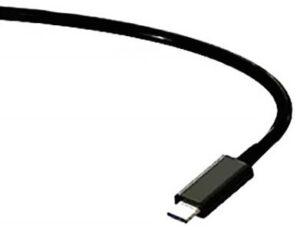
    When you're buying a new external hard disk drive, you have choices in connectivity options. Previously, those choices included FireWire, USB 2.0 or USB 3.0 (the current industry standard). There's a new kid in town when it comes to device connectivity. Well, actually Thunderbolt isn't new, it was first introduced early last year, but it's finally making headway in the consumer market as a rival to FireWire and USB 3.0. 


    Does that mean it's time to dump all your external hard disk drives and upgrade to this “lightning fast” new technology? 


    Not quite. While major manufacturers like Lacie and Drobo are already creating devices with Thunderbolt ports, most hard disk drives will still come with USB 3.0, and maybe even FireWire, connectivity options, too, in the foreseeable future. 


    Is Thunderbolt better than the other connectivity standards? Let's take a look at some of its features. Thunderbolt: 


    - Supports both PCI Express and DisplayPort connections from one port

    - Can support DVI, HDMI, VGA, FireWire, eSata with adapters

    - Upload and download times up to 10 gigabits per second, 20 times faster than USB 2.0 and 12 times faster than FireWire

    - Daisy-chain devices without a noticeable loss in speed


    Faster Transfer = Easier Back-ups

    Speed, of course, is the key selling point for Thunderbolt ports. Ten gigabits per second, with potential for even faster speeds in future incarnations, makes data transfer easier, especially when it comes to downloading large movie and music files. 

    Such blazing fast download and upload speeds also offer another benefit: quicker back-ups. Thunderbolt allows you to copy the entire contents of your PC, Mac, tablet or netbook's hard disk drive to an external drive for back-up in mere minutes; there's no excuse to not back-up your data regularly. 

    Remember, even the most cutting-edge hard drive or solid state drive technology can fail after a certain amount of read/write cycles. Regular back-ups are the best way to protect your data. But if you should encounter a data recovery emergency and your back-ups failed (or you didn't have any) remember that 24 Hour Data is here to help. No judging. No blame. Just fast, successful hard drive recovery at reasonable prices. 

  • Posted on: 7/26/2012


    Drobo Recovery


    Drobo's high-end desktop hard disk drive storage solutions for businesses and consumers looking for increased capacity, capabilities and stability have been missing one facet -- until now. The company's newly introduced hard disk storage units have Thunderbolt compatibility.


    If you're unfamiliar with the term, Thunderbolt is a “lightning fast” (get it?) protocol for data transfer. Drobo has introduced the 5D, a “Bring Your Own Device” desktop storage device that holds up to five hot-swappable 3.5 inch hard disk drives, offering two Thunderbolt ports and one USB 3.0. 


    Its little brother, the Mini, holds four 2.5-inch hard disk drives in a unit that weighs less than three pounds fully loaded. The Mini also has two Thunderbolt and one USB 3.0 port. Five LED strips across the front of the unit warn users when a drive is failing or is nearing its capacity. 

    About Drobo's BeyondRAID Technology

    A Drobo hard disk storage device like the D5 is similar to a RAID controller, offering the redundancy of RAID with a few added benefits. 

    Drobo's BeyondRAID technology permits users to add storage capacity without changing RAID levels or re-initializing the entire array. All drives are hot-swappable, so you can switch out a 500GB drive for a 1 TB, or even switch an HDD with a solid state drive for the best in speed and capacity. Both the D5 and the Mini accommodate today's state-of-the-art hard disk drives from all major manufacturers like Lacie, Seagate and Hitachi, as well as Solid State Drives. 

    Is Drobo RAID? 

    A Drobo storage device is not actually a RAID controller but, in many aspects, it performs as one. If the drives in your Drobo should fail, and you require emergency hard disk drive data recovery, you may need expert help to restore your data. 

    A number of things can happen when using a Drobo storage device or any RAID array, for that matter: 

    - You or your IT staff may not have the device set for dual-disk redundancy, so if two or more drives fail, you could lose mission critical data

    - Although all Drobo storage devices are equipped with battery back-up in the event a power surge or power outage makes it impossible to access your data, you may not be able to copy your data before power runs out.

    - The hard drives in your Drobo array, as with any RAID array, are susceptible to power surges that can corrupt mission critical files, accidental deletion and viruses. 

    Fortunately, in the event one or more hard disk drives in your array fail, making a “hot swap” is easy with Drobo, which means even less downtime as you call 24 Hour Data to restore your lost data. 


  • Posted on: 7/24/2012

    RAID Data Recovery


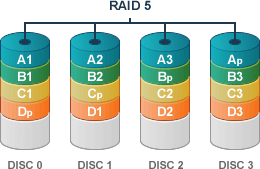
    There's a misconception within the IT community that RAID 5 servers are virtually fail-proof. It's true that they are relatively stable and that the use of mirroring and striping both enhances performances and creates redundancies that make data loss less likely. However, a server built using any level of RAID can still fail. Here are five things that can go wrong with a RAID server. 


    1. A hard disk fails, creating adding stress on the other hard drives in the array. - Since hard drives in a RAID array are usually around the same age, when one fails due to the end of its read/write life cycle, the other drives may not be far behind. When a RAID operates with one drive missing due to a failed drive, it speeds up the degradation of the other drives. Cascading failure may result, causing a need for emergency data recovery services. 


    2. Controller failure - The failure of a RAID controller in an array can cause the loss of mission critical data. 


    3. System file corruption caused by viruses or other logical hard drive failures - The redundancy in a RAID array is designed to protect against data loss in the event of the physical failure of a single hard drive due to old age or other factors. Once a virus enters the system, however, it spreads rapidly to every drive in the array, resulting in logical hard drive failure and the loss of mission critical data. Fortunately, logical recovery is often easier, and less expensive, than physical data recovery. As long as you rely on a trusted professional data recovery service, the likelihood of a full recovery is extremely high. 


    4. A power surge or other physical event damages all drives in the array - Redundancies don't mean anything if your RAID array experiences a power surge, extremely common in these warm months when Dallas businesses face thunderstorms, tornadoes, and brown-outs due to hot weather. If your drives suffer physical failure, a data recovery service can help you recover your lost data quickly to minimize down time for your business. 


    5. Accidental deletion of files - This is more common on personal computers and mobile devices, which are often handled by children or inexperienced technology users, but we see it happen often enough in a business setting, as well. If important files, such as system files that keep your RAID array functioning, or even mission critical business files, are deleted, they can often be recovered by an experience, professional data recovery firm. 


    Not sure what happened to your RAID array, but can't access your files? Whatever the problem, you can trust 24 Hour Data to recover your data promptly. 

  • Posted on: 7/19/2012


    VMware Recovery


    1. Make sure you meet the minimum hardware requirements - These should be published in your VMware user manual. Hardware requirements include processing power, RAM, hard drive space, operating system, and your LAN or WAN speed and bandwidth. 


    2. Verify your hardware configuration for the number of user stations you'll be deploying.


    3. Verify your server meets software requirements, including the right operating system and any peripheral software. 


    4. Ensure you have the installation DVD or have downloaded the appropriate software. 


    5. Before you begin to set up your database and virtual server, make sure all your data is backed up in two different ways. - You may opt to “ghost” your server to a matching machine, use tape back-ups, back up your data to the cloud or back it up on a large external hard drive. As USB drives drop in price and increase in size, this is becoming a practical way to back up large amounts of data. As with any back-ups, ensure you keep at least two copies, with one stored at a remote location or in the cloud for 24/7 access from anywhere. 


    6. Plan for downtime during the upgrades, or make a contingency plan so that your employees can continue working as usual. Ideally, the upgrade can be performed over night or during a holiday to minimize downtime. If this requires paying your IT staff overtime, perform a cost-benefit analysis to compare the additional pay vs. the consequences of server downtime. 


    7. Make sure you have the phone number for 24 Hour Data handy in the event of a data recovery emergency, just in case those back-ups don't work. 


  • Posted on: 7/17/2012


    Photo Recovery


    Between graduations, vacations and summer weddings, more family memories are made during the summer than at any other time of year, except maybe the holiday season. 


    Even if your vacation is just a stay-cation to take in local attractions, you might take pictures to commemorate. If you're a parent, you know that your kids will not stay young forever and photos and videos are a good way to capture the moments of their life. Summer is about family time, the moments we want to remember and share forever. 


    Smartphones make it easier than ever to capture all our family memories, from the big moments to the small. But what if something happened and you lost all those photo and video memories? 


    Unfortunately, one benefit of a smartphone (it's so easy to take anywhere) is also a drawback. When your phone is with you all the time, it increases the odds that it will suffer shock or water damage, which can result in catastrophic data loss. Smartphone memory cards are also prone to logical and physical damage caused by extreme heat, common in Dallas during the summer.


    “Not Fortune 500... But Priceless” 

    While businesses often have the contact information of a data recovery service available as part of their disaster preparedness and recovery plan, families and individuals may not think about data recovery -- until it's too late. 


    If you've lost your vacation photos, baby pictures, or special event images and videos, due to accidental deletion, corruption or heat or water damage, we'd recommend not attempting do-it-yourself data recovery. If your attempts fail, you could lose your data permanently. 


    Instead, call 24 Hour Data for a fast, honest estimate and quick turnaround time. You have more important things to worry about than whether or not we'll get your memories back. There's a better-than-99-percent chance we will! (And if we don't, you don't pay a dime.)  And who wants to waste their summer worrying, anyway? 


    Call 24 Hour Data, pour yourself a drink and relax. We offer hard drive recovery, mac recovery, and photo recovery from all forms of storage media. 


Pages

Subscribe to Blog